Revora / Independent B2B SaaS
Sales flexibility.
Pricing boundaries.
Designing a quoting workflow that gives sales room to work—without asking them to interpret every commercial rule.
- My role
- Product design & implementation
- Focus
- Workflow architecture · Interaction design
- Stage
- Working product · Pre-pilot
01 / Review the offer
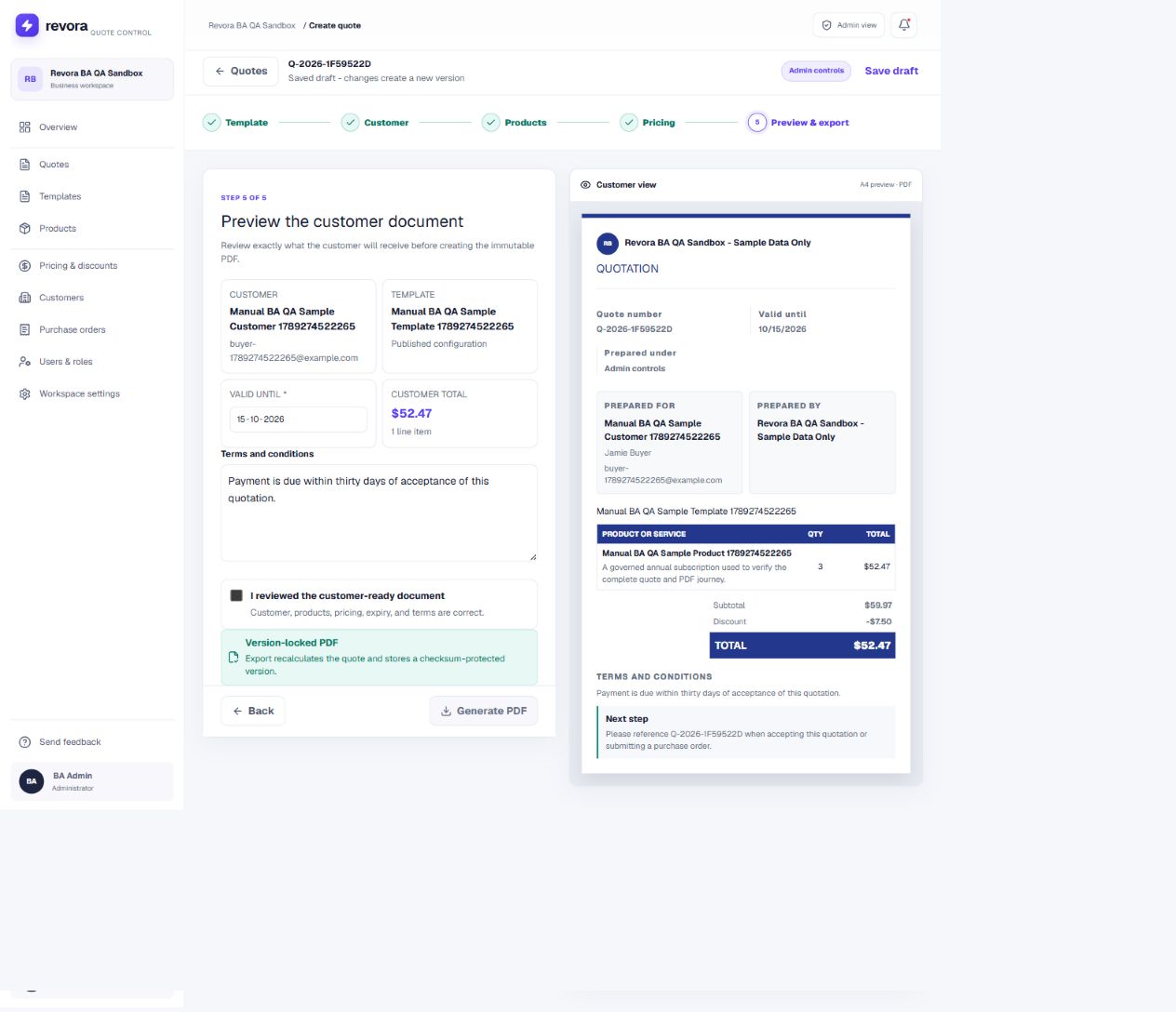
Commercial terms and explicit confirmation stay together before export.
02 / Check the customer view
A separate document preview shows what will leave the workspace.
Swipe across a screen detail, or open the original.
The short version
I took Revora from a template-driven quoting concept into a working application. The hardest design problem was not arranging fields. It was deciding who could change each value, when the product should intervene, and what must stay trustworthy after a quote is saved.
The result is a focused, role-aware workflow for supported fixed/per-seat pricing and discounts. Technical checks support that core path; customer adoption and business impact have not yet been established.
01 / The opportunity
A quote carries more than a price.
A salesperson needs to assemble an offer. An administrator needs it to respect the product catalog, discount limits and approved terms. The customer needs a document clear enough to act on. These are connected jobs, but they do not need the same interface or permissions.
Revora began with a product hypothesis: there may be room between flexible spreadsheets and complex configure-price-quote tools for a more focused quoting workflow. A spreadsheet lets someone change almost anything; that flexibility also makes it difficult to distinguish an intentional exception from an accidental override.
I did not treat that hypothesis as proven market demand. It gave me a concrete design question: how could the product make an approved quote easier to create than an incorrect one?
02 / Discovery
Start with the rules behind the form.
My starting evidence was the evolving product brief, workflow discussions, design explorations and implementation constraints. This was founder-led discovery—not a completed interview study. I used that material to identify questions the interface had to answer before adding more screens.
Separate catalog values from sales inputs.
Does the server enforce the same boundary?
Put feedback beside the pricing decision.
Can a user distinguish a warning from a block?
Store the offer as a versioned record.
Does it survive a later catalog change?
A synthesis of product discussions and implementation constraints—not interview findings.
The role split and required quote behavior gave me a testable scope. Problem frequency, fit with existing tools and willingness to adopt remained hypotheses. My work connected that framing to information architecture, interface decisions and design QA—not fictional personas or estimated time savings.
03 / Product sitemap
Give configuration and quoting their own home.
The catalog, rules and templates feed the quote journey. Keeping those setup tasks separate lets the builder focus on the offer in front of the salesperson. This map groups the current navigation by responsibility; it does not imply that every role sees every destination.
Configure the offer
Admin-owned setup
- ProductsApproved catalog & list prices
- Pricing & discountsRules, limits & messages
- TemplatesQuote structure & published terms
Create the quote
Core sales journey
- CustomersRecipient details
- QuotesCreate, save & reopen
- Template
- Customer
- Products
- Pricing
- Preview & export
Manage the workspace
Supporting destinations
- OverviewWorkspace entry point
- Users & rolesAccess boundaries
- Workspace settingsOrganization configuration
- Purchase ordersOutside this study’s verified path
Editorial grouping of the observed product navigation. This is a sitemap, not an exhaustive permission matrix or a claim that every module is validated.
04 / Roles & workflow
Separate policy from the work of selling.
I organized the product around responsibilities rather than demographic personas. Administrators establish commercial boundaries. Sales uses that configuration to build a customer-specific offer. Giving both roles the same unrestricted editor would make the distinction cosmetic.
Admin / Sales operations
Prepare the conditions.
- Maintain approved products and list prices.
- Define discount limits and quote behavior.
- Publish templates and terms.
- Separate internal information from customer output.
Sales
Compose within them.
- Select a published template and customer.
- Add approved products and quantities.
- Adjust only permitted inputs.
- Resolve feedback, review, save and export.
- 01Template
Start from published configuration
- 02Customer
Identify the recipient
- 03Products
Choose approved line items
- 04Pricing
Adjust permitted inputs
- 05Review
Check the customer document
A simplified explanation of the implemented five-step builder. The original FigJam explorations remain below.
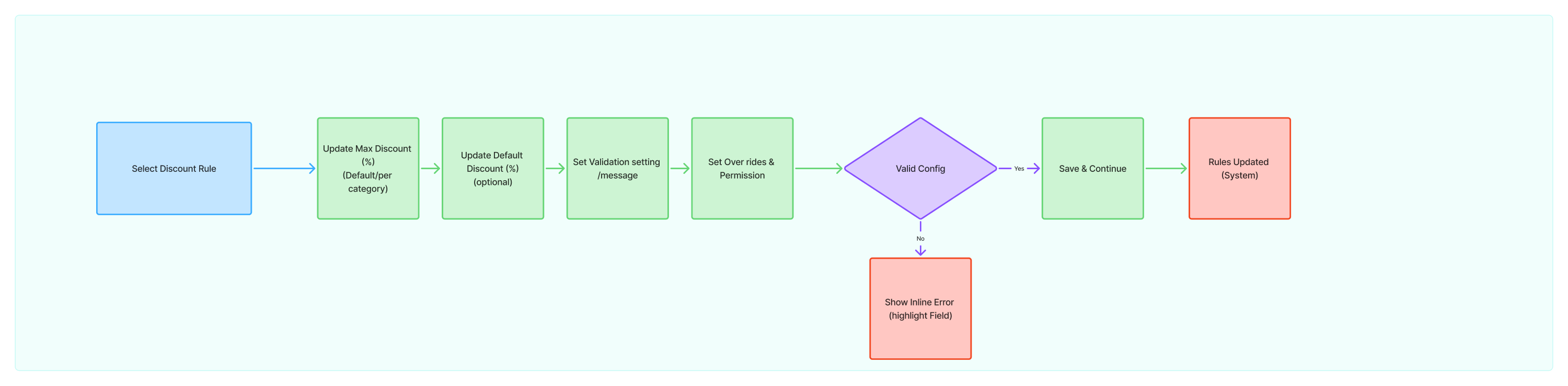
The original flow makes the dependencies explicit.
My Admin flow maps selecting a discount rule, setting limits and messages, validating the configuration and saving it. The Sales flow then maps customer information, products, live calculations and a validity decision. Invalid input leads to inline feedback; valid input can become a draft or move into export review.

Explore the original flow board ↗
The key distinction is between working, correcting, saving and committing a customer-facing document. Validation happens during pricing and again on the server; it is not an extra task sales must remember.
05 / Design decisions
The important choices are where freedom stops.
Decision 1 / Ownership
Protect the value, not just the input.
An unrestricted editor would be faster to build, but would push commercial judgment back onto the person filling it in. I chose explicit ownership instead. The trade-off is less flexibility for unusual deals; a clear boundary was preferable to a hidden override.
Editable
Quantity & permitted discountSales can adjust within configured limits.
Protected
Catalog unit priceRead from approved product configuration.
Calculated
Subtotal & final totalDerived and checked again by the server.
Internal
Cost & administrative contextKept separate from customer-facing output.
Interaction model—not a recreated product screen. The distinction must be enforced in behavior, not only appearance.
Decision 2 / Feedback
Intervene while the decision is still editable.
An error discovered only at export forces someone to revisit a quote they thought was finished. I placed commercial feedback beside pricing instead. A permitted change updates the summary; a blocking condition explains the limit and prevents progression.
Calculate
Update the quote summary as permitted inputs change.
Continue remains availableDraw attention
Show the configured warning beside the editable field.
Review the warningRequire correction
Keep the input editable but prevent progression.
Continue is disabledThe inspected sandbox warns above 10% and blocks above 25%. These are sample business settings. Clearer warning-versus-block wording remains a next iteration.
Blocked discount / Actual product state
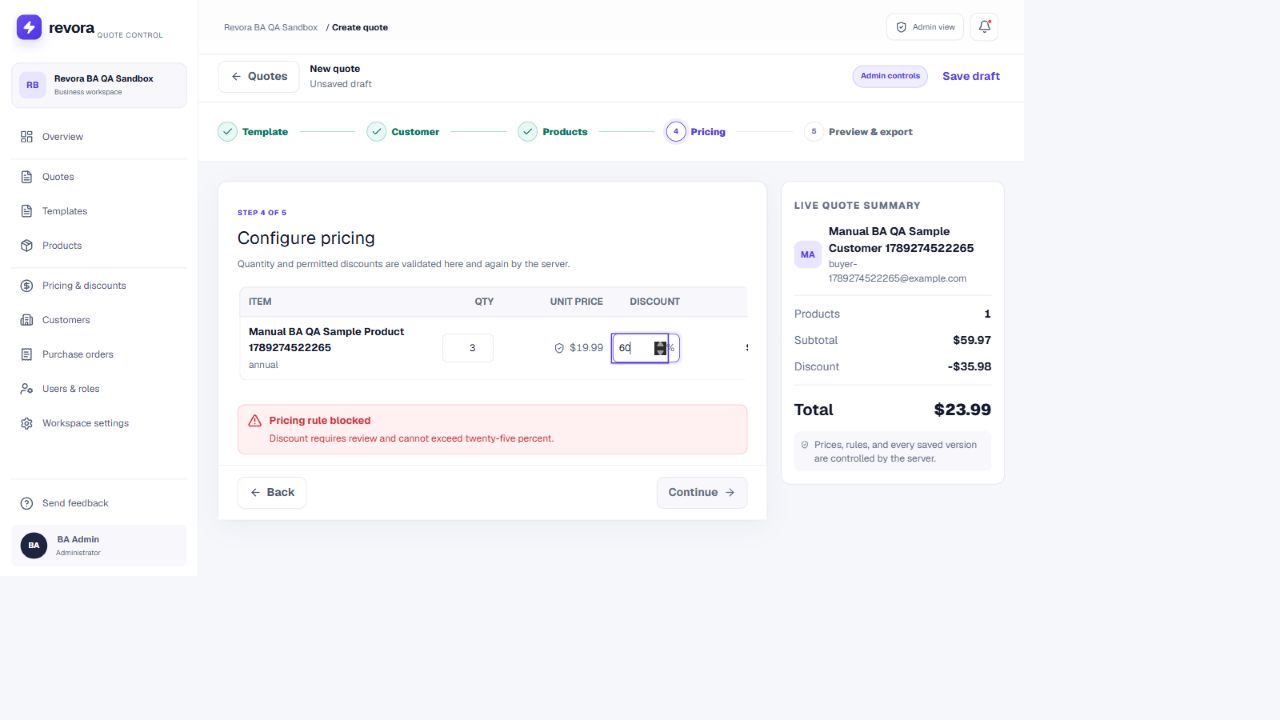
At 60%, the rule blocks progression. The quote stays editable so the user can correct it.
Swipe across a screen detail, or open the original.
Decision 3 / Continuity
Keep commercial context in view.
A step-by-step flow reduces simultaneous decisions, but can make the overall quote harder to track. I paired the sequence with a persistent summary: customer, product count, subtotal, discount and total remain available while the main area changes.
I chose that continuity over putting every field on one dense page. The cost is more navigation. The intended benefit is a clearer relationship between an input and its effect; whether that reduces mistakes needs observation with sales users.
Decision 4 / Finality
Make export a review state, not a shortcut.
The last step brings expiry, terms, customer details and the document preview together. An explicit review confirmation precedes PDF generation. The transition from an editable quote to a customer-facing record should be unmistakable.
That adds friction deliberately. A PDF is portable: once shared, an error cannot be corrected simply by changing a field in the app. Server recalculation and a version-locked export support the boundary the interface communicates.
Decision 5 / History
Tomorrow’s catalog must not rewrite yesterday’s offer.
A saved quote needs to retain the prices and customer details used when it was created. I treated historical state as part of the experience, not only a database concern. Otherwise someone reopening a quote could see a different offer without having made a new decision.
Versioned records require more deliberate handling than a live catalog reference. The trade-off is worthwhile: technical validation checked that an existing quote retained its price after a catalog update while a new quote used the new value.
06 / Evolution
The working product made the scope more precise.
The original board explored a broader workspace: onboarding checklists, template browsing, multiple export formats and export history. The current product narrows the key journey into a guided builder and PDF review. The flow’s decision boundaries survived; not every early branch became a shipped capability.
Implementation also exposed the difference between a visible option and a supported calculation. The most important evolution was therefore not decorative. It was toward explicit support boundaries: fixed/per-seat prices and supported discounts on the core path; unsupported taxable, tiered, prorated and usage-based calculations blocked rather than quietly producing an unreliable quote.
From quote document to governed workflow
Connected setup, permissions, validation and saved output instead of treating the PDF as the entire product.
From visible controls to enforced behavior
Connected protected prices and role boundaries to server checks, not just interface styling.
From broad options to an honest supported path
Used technical findings to narrow readiness claims before real-company onboarding.
Figma supported flow and interface exploration; ChatGPT helped explore UI directions and Codex supported implementation. Not every shipped screen began as a completed Figma frame. My responsibility was to specify behavior, judge the generated output, connect states and inspect what actually shipped.
Generated output is not research evidence. It makes the product testable. The separate Revora Design System study covers reusable foundations; this story concerns the product decisions those foundations serve.
07 / Working product
One controlled path, from setup to customer document.
The shipped interface connects administrative configuration to quoting. The rule list makes ownership visible; the builder applies that configuration; the preview shows what leaves the workspace. These are current product captures, not polished mockups presented as production.
Configure once. Apply during quoting.
Administrators manage versioned rules. Sales should not need to rediscover those policies for each offer. Broader rule categories remain visible in navigation; that does not mean every category is supported by the calculation engine.
Admin configuration / Versioned rules
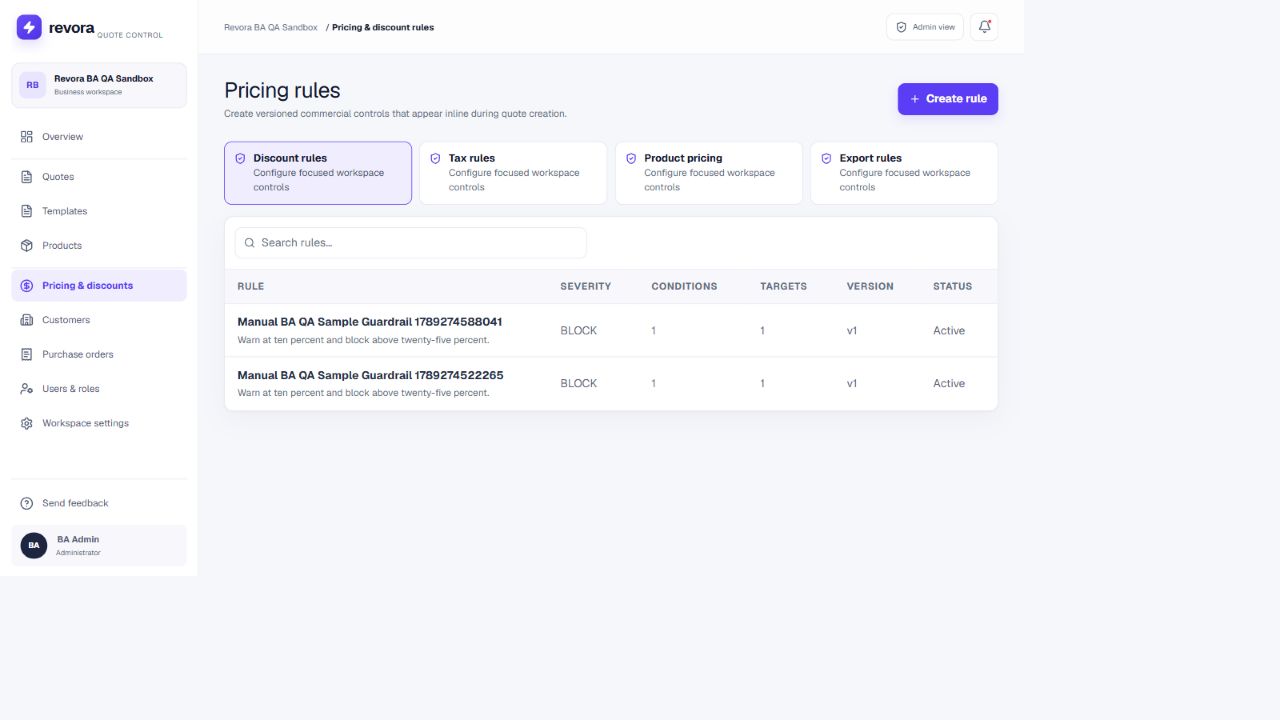
Severity, version and status make the rule’s current configuration inspectable.
Swipe across a screen detail, or open the original.
Give each quote an approved starting point.
Only published templates are offered in the builder. Template selection brings configuration into the quote before sales starts editing, while the stepper explains what comes next.
Quote creation / A prepared starting point
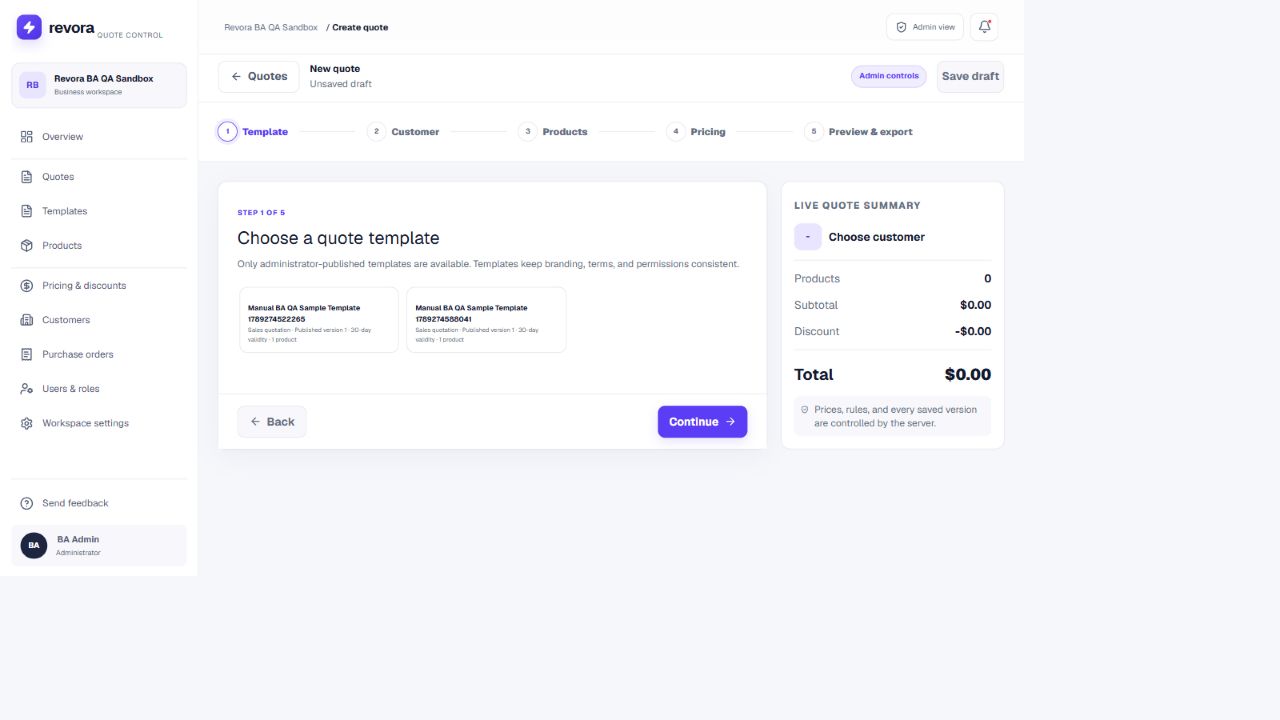
Published templates provide the starting configuration; the stepper sets expectations.
Swipe across a screen detail, or open the original.
Show the effect of each permitted change.
In this sample, three units at $19.99 produce a $59.97 subtotal. A 12.5% discount becomes $7.50 after rounding, leaving $52.47. The same amount appears in the saved preview. This is a correctness example, not a revenue or impact metric.
01 / Make the pricing decision
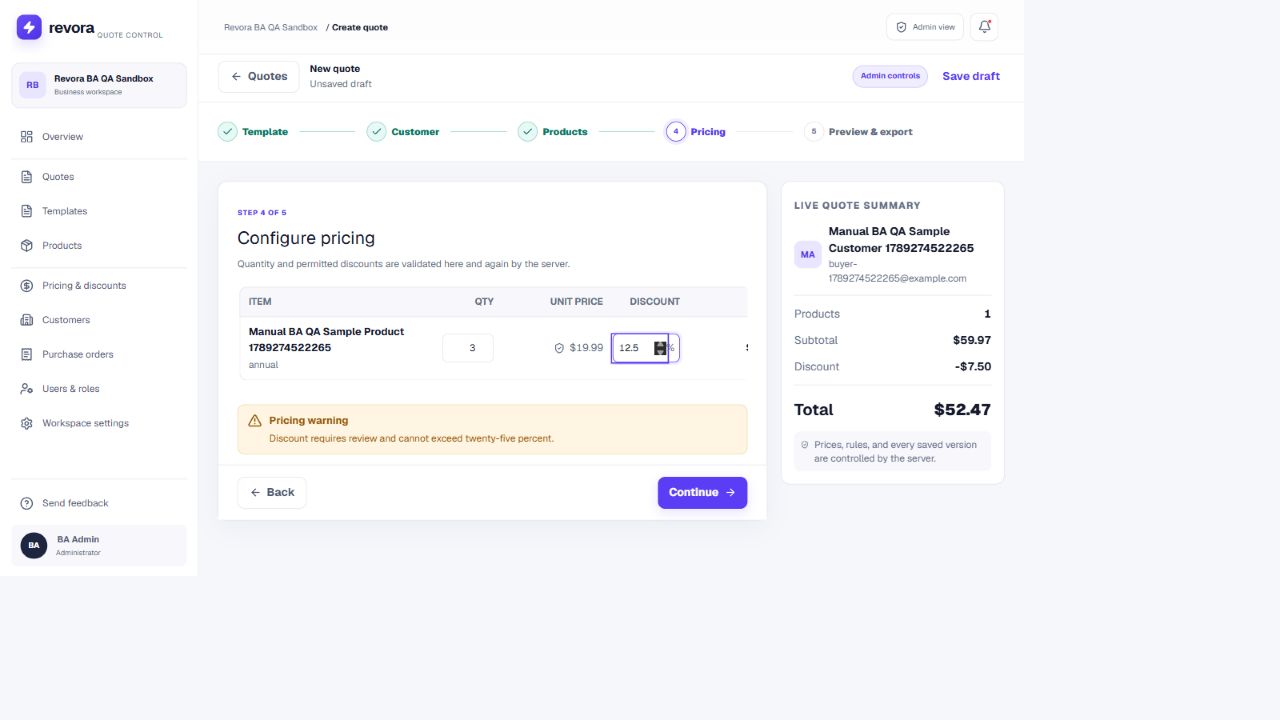
The editable discount and its warning are in the same context.
02 / See the consequence
The summary retains the calculated total: $52.47.
Swipe across a screen detail, or open the original.
Review the offer as the customer will see it.
The final preview shown at the beginning of this story keeps editing controls separate from the customer document. Recipient, terms, expiry and total can be checked before export. A saved draft is not the same state as a generated PDF.
Open the live product ↗ · Access is controlled. Ask me for a walkthrough to explore both roles without publishing account credentials.
08 / Validation & status
A working flow is evidence—not proof of product-market fit.
The pre-pilot technical review tested supported calculations, discount boundaries, role separation, workspace isolation, saved-quote persistence and PDF output. Its documented lifecycle check covered configuring a quote, correcting an invalid discount, saving, signing in again, reopening the record and generating its PDF.
During this case-study review, I also inspected the live sandbox and reproduced the pricing states shown above. This is product and technical verification. It does not establish that a sales team finds the workflow intuitive, adopts it regularly or saves time using it.
- 1Configure a quote
- 2Correct an invalid discount
- 3Save the draft
- 4Sign in again
- 5Reopen the record
- 6Generate the PDF
Sequence documented in the pre-pilot technical review. User comprehension, adoption and business impact need separate evidence.
Evidence available
Core-path behavior
Supported fixed/per-seat calculations and discounts; saved versions; PDF consistency; tested role and workspace boundaries.
Still to establish
Usability and adoption
BA/UAT and exploratory QA are underway or prepared. Founder outreach is underway. No completed customer pilot, adoption figures or commercial outcomes are claimed.
Next, I would observe administrators configure an offer and salespeople complete it without coaching. I would watch where they hesitate, whether they understand a warning versus a block, and whether the preview gives them confidence to export. Those are proposed validation questions, not completed findings.
09 / Reflection
Clarity depends on what the product can promise.
Revora changed how I think about simplifying enterprise work. Removing controls is not enough. A simpler interface has to preserve the business meaning of what remains: who owns a price, what a warning permits, when a document becomes final, and why a historical record should not change.
The strongest part of this work is the connection between those decisions and a running, inspectable workflow. The weakest part is the evidence I do not yet have: independent user behavior and adoption. I would rather make that boundary clear than turn a technical pass into an invented business outcome.
Next, I would improve rule-message specificity, test the five-step sequence with target users, and resolve the release gates before widening scope. The ambition is still a fast quoting experience. The lesson is that speed is only valuable when the person using it can trust the result.